




Staff overview you won't outgrow

Employment contracts in folders, competency overview in Excel, onboarding in one person's head. Business Online gathers everything about your employees in Microsoft 365, with the right access for HR, managers and employees.

Do you recognise these growing pains?

Everything in one person's head

Who has an overview of employment contracts, probation interviews and personnel documents? One person. And that person has two weeks' holiday in July. What happens then?

Who is working on what?

Management doesn't know who is available, who is overbooked, or who is actually working on what. Projects are staffed on a gut feeling.

New employee starts on Monday. Nobody knows what to do.

IT will order a PC. The manager should set up meetings. HR has to send the agreement. But no-one has a plan, so half of it is forgotten. Every time.

Excel is not an HR system

Employee list, onboarding checklist, holiday overview, all in the spreadsheet. When the company passes 30 employees, the whole thing collapses.

From spreadsheets to structured HR

Personnel data, onboarding and resource overview gathered in one platform, in the tools you already open every morning. Built on Microsoft 365.

Replaces «ask Hilde in HR»

Staff workroom

One place per employee. HR sees everything, managers see their team, employees see their own information. Access controlled, always up to date. No person is irreplaceable.

Replaces ad-hoc onboarding

Lifecycle checklist

Standardised onboarding, probation and offboarding with a quality control plan (QCP). Nothing is forgotten, no matter who is in charge.

Replaces asking around

Resource Planner

See who's available for new projects, without asking around. Connect employees to project roles across the organisation.

Replaces routine questions to HR

Self-service (My Page)

Employees update their own information, upload documents and request time off, all by themselves. HR is relieved of routine issues and frees up time for what actually matters.

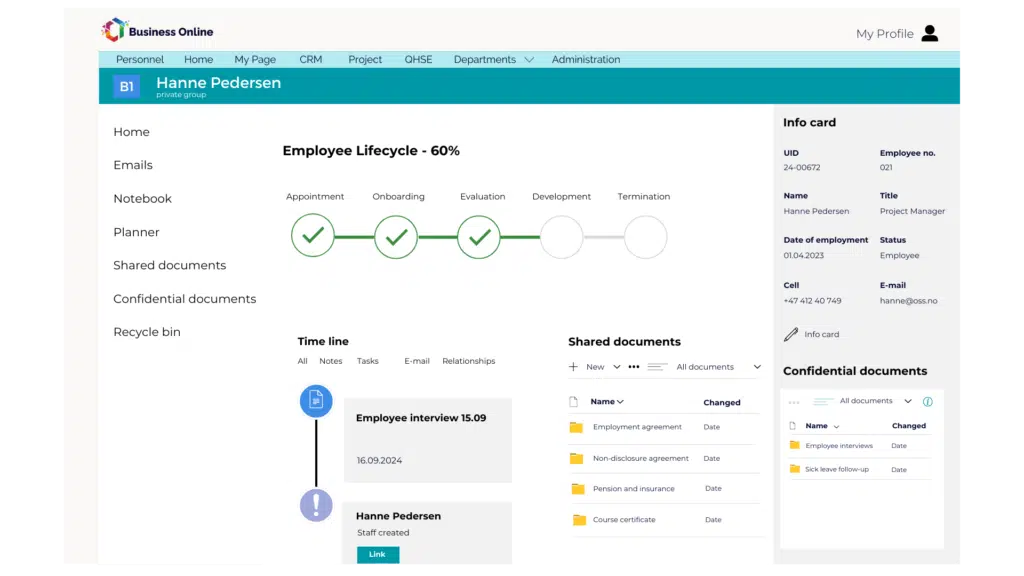
[Mockup of staff workroom with life cycle checklist]

“Often you don't realise you need a system like this until you're presented with it. We quickly realised that Business Online could help us gather everything in one place and give us better control."

How Business Online Personnel works

A closer look at the features that give structure to employee data, onboarding and resource planning.

My Page - Self-service

Employees update themselves. Manager approves. HR is relieved.

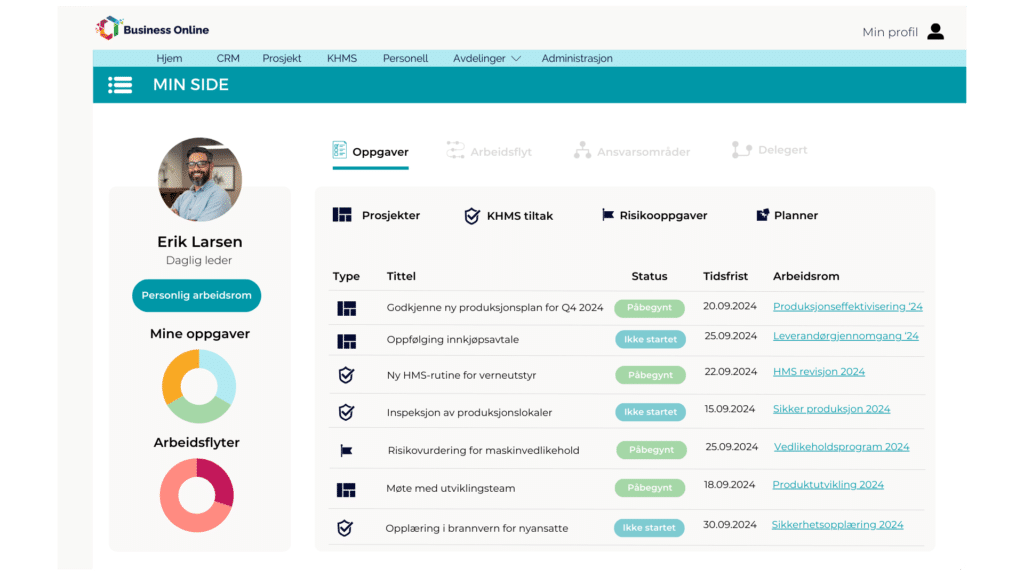
Through My Page, employees can update contact information, view personal documents and request time off. Changes are automatically sent to the manager for approval, not to an HR queue that piles up.

The result: fewer routine questions for HR, and more time for what HR should really be doing, building culture and following up on people.

Personal dashboard in Business Online showing task overview, workflows, and project assignments for a company leader.

Mockup of My Page with personal information, documents and authorisation tasks

Resource Planner

See who's available, without calling around

A Gantt-based overview showing availability per employee across all projects. Navigate by week, month or quarter. When someone is booked on a project, the overview is updated in real time.

Because the planner connects directly to the project module, you see staffing across the entire organisation, not just what you happen to remember from the last meeting.

Resource planner mockup with Gantt view of availability per employee across projects

Staff workroom

One place per employee, with the right access

Each HR workspace brings together the employment contract, documents, competency overview and a complete timeline of events, conversations and notes. HR sees everything, managers see their team, employees see their own information.

The difference from a shared folder on the server: here you know who has access to what. And you don't have to wonder if sensitive information is lying around.

Mockup of staff workspace with employee information, timeline and access levels

One platform. Four less growing pains.

The People module gives structure to HR. But when people are linked to projects, quality and customers, you know who does what, everywhere.

QHSE

Quality in every project

Non-conformities and risk assessments linked directly to the project they belong to. When the auditor asks, you have the answer.

CRM

The sales opportunity is closed. The project is created. Customer information is automatically included - no double registration, no forgotten details.

PROJECT

See who's available. Connect employees directly to project roles. End overbooking and gaps in staffing.

Frequently asked questions about project management

Personnel data, onboarding, competence and resource planning, gathered on Microsoft 365. HR, managers and employees see what they need to see, with access control per role. Built on the tools you already use.

Right. Contact information and personal documents - employees organise this themselves via My Page. Changes go to the manager for approval, so HR doesn't have to be a bottleneck for routine changes.

A quality control plan (QCP) divides onboarding into phases: pre-startup, first day, first week, trial period. Each point has a responsible person and a deadline. The same structure works for probationary follow-up and offboarding, so nothing is forgotten no matter who is in charge.

Yes. Employees are linked directly to project roles. You'll see who's available across all projects in one Gantt view, without making phone calls or checking three different lists. When someone is booked, the overview is updated in real time.

Grønn Jobb is good at OHS and HSE. But it doesn't know which projects its employees are working on, or which customers they own. Business Online connects people to projects, customers and quality systems in a single platform.

Answer. You can start with Personnel, and add the rest as the need arises. The interesting thing happens when employees are connected to projects, HSE events follow the person, and customer relationships are visible when someone leaves.

Learn more about HR and onboarding

Do you have questions about HR?

Write to us and we'll be in touch within one working day. Or, book a demo with us directly.

Ready to grow, without the growing pains?

See the platform in action. 30 minutes. No obligations.


Want to see how it works? in fact works?

Try our interactive demo now👇