
Business Online + AI · MCP included
Use AI for customer follow-up, projects, and deviations.
With Business Online MCP, you can use Copilot, Claude, or ChatGPT to retrieve information and register updates in selected parts of CRM, projects, and KHMS. The information is collected in Business Online on Microsoft 365.
Business Online MCP comes with it, and you don't need to be AI experts. We help you with AI tools, setup, and access.

AI in practice
Which task do you want to start with?
Business Online MCP allows the AI assistant to retrieve information and perform available registrations. See how it can be used in customer follow-up, project work, and quality work.
AI for customer follow-up. From the customer meeting to a shared history.
CRM
Have AI retrieve registered contact information and open sales opportunities before the meeting. After that, you give the assistant the note and ask them to record it in the customer's timeline.
"Show contact persons and open sales opportunities for Eksempel AS."
Before the meeting · example
"Show contact persons and open sales opportunities for Eksempel AS."
After the meeting · example
You enter the meeting prepared. Afterwards, the note is placed on the customer’s desk, and colleagues can follow up without waiting for you.
See CRM and customer follow-up ↗
Product image of the CRM workspace. A completed registration on the customer's timeline can be found here.
AI for project management. Get status and record decisions.
Project
Download project information and the latest recorded events before the project meeting. Have AI record the summary on the timeline afterwards.
"View status and timeline entries from last week in the Project Example"
Before the meeting · example
"Register a note on project Example: We agreed on a site visit on Thursday. The delivery date will be clarified after the site visit."
After the meeting · example
The meeting is documented before you have left the room, and the team updates the project. Quality control plans can be read through the MCP; check points are updated in Business Online.
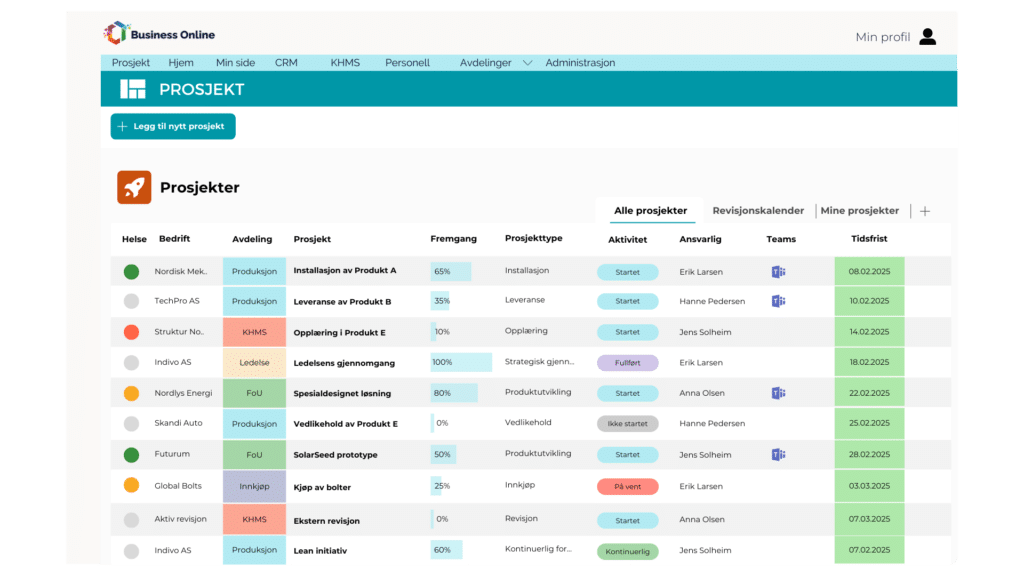
Product image of the project module. AI uses the project information the connection provides access to.
AI for incident management. From observation to recorded case.
QHSE
Describe what happened and which project the case relates to. Ask AI to record the discrepancy or pull open cases for the next review.
"Report a defect on project Example: The delivery lacked two fixing brackets. The installation has been put on hold."
Register · example
"Show open deviations in the Project Example."
Download overview · example
The observation becomes a matter at once, not a note that disappears. The responsible person finds it in Business Online, can check the information and follow it up.

Product image of the KHMS module and deviation registration, but now you don't have to go through the deviation form. Your AI client registers it for you in Business Online.
The examples illustrate possible workflows. Check the answers and that the desired registration has been performed.
How it Works
1
You ask
Type a question in Claude, Copilot, or ChatGPT.
2
The AI retrieves
The AI client connects to Business Online via MCP, Anthropics’ open standard for secure AI access to corporate data. The same access control as regular login. Everything is logged.
3
You get answers
Not generated. Taken from your actual company data. You can also update and create directly.
Business Online + AI in under 60 seconds
You've just come from a customer meeting. Everything you remember is in your head. 60 seconds later it's logged in the system.
The foundation lies in Business Online
AI is only as good as the information it receives.
Business Online brings CRM, project management, HRMS and HR together in Microsoft 365. The platform provides a common structure for the work. MCP makes selected data and actions available to AI.
Gather the information where the work is being done
Link the information and follow-up to the customer, project, or case they are involved with. This provides both colleagues and a connected AI client with a clearer starting point.
Use AI for listings and registrations
The AI client retrieves available information from Business Online and forms a response. You can also have it perform registrations and updates the connection supports.
Let the follow-up continue in the system
Once a registration is completed, the information is located in Business Online. Colleagues can find it again and continue their work within the applicable access options.
The entire chat is not automatically stored in Business Online. The processing of the conversation follows the terms and settings of the AI tool you use.

PSS Securitas · AI in the workplace
The information was there. AI made it faster to use.
"I could have found it myself, but now I got the answer within a few seconds."
Christofér Næsheim
Operations Manager Norway, PSS Securitas
PSS uses AI to compile a list of shifts that are lacking staff. Customer experience shows the value of having the information already collected in Business Online.
The example applies to PSS's configuration. Staff and shift schedules are not included as a general access in the standard connection.
Business Online MCP
What can AI use in Business Online?
MCP is the connection between the AI assistant and Business Online. It provides access to specific data areas and actions.
You still choose whether to work directly in Business Online or use a connected AI client for tasks it supports. MCP is built on an open standard which is supported by an increasing number of AI tools.
| Data area | Pick up | Register/update |
|---|---|---|
| Companies and contacts | Yes | Yes |
| Sales opportunities | Yes | Yes |
| Projects and timeline | Yes | Yes |
| Deviation | Yes | Yes |
| QCP and master data | Yes | No |
Outside the standard connection: Personnel, contracts and termination. Quality control plans (QCPs) can be read, but the check points are updated in Bsuiness Online. Access to QCPs does not mean general AI access to all documents or the KHMS tools. Which information, fields, and actions you can actually use depends on the setup and permissions
From an opportunity to a way of working
Start with one task that you are familiar with.
A customer meeting, a project update or a deviation report. We start from the work you want to make easier.
01 · The assignment
Find a specific need
Choose something you do today and determine what information you need or want to register in Business Online.
02 · The connection
Arrange tools and access
MCP works with Business Online. We arrange the AI client, the necessary license, setup, and the data and actions you need.
03 · Work flow
See how it works
In a review, we show the interaction between the AI assistant and the BO, and where a recorded recording can be found.
Good to know
Questions about AI and Business Online
Here you will find answers about inclusion, clients, access, and storage.
What is Business Online AI?
It is the interaction between Business Online and a connected AI assistant. Business Online collects information and provides follow-up in the platform. Through Business Online MCP, the assistant can retrieve information and perform available registrations and updates.
What is the difference between the AI client and Business Online?
The AI client is the tool you ask questions in. Business Online is the system where customer information, project follow-up, and deviations have structure and history. Business Online MCP connects them together, and therefore AI provides more value when the information is already gathered in one place.
Does MCP come with the subscription?
Yes. MCP comes with Business Online for new customers. Existing customers also receive the connection, unless they choose to opt out. The AI tool requires necessary access or license, and setup and access must be in place.
Can we use Copilot, Claude, or ChatGPT?
Microsoft Copilot, Claude, and ChatGPT can be used with Business Online MCP. We will arrange support, licensing, and setup for the client you want to use before you start using the connection.
How is access controlled?
The connection requires authentication. Settings and access control dictate which data and actions the AI client can use. Requests are logged. Deletion is not available through the standard connection.
Will the entire AI conversation be stored in Business Online?
No. Once a requested registration is completed, it is stored in the customer, project, or case in Business Online. The entire chat is not automatically stored there. The conversation processing follows the terms and settings of the AI tool you are using.
Who owns the information in Business Online?
You. The information in Business Online belongs to your company, even when you use AI. The connection gives the AI client access to retrieve and record information; it does not transfer ownership.
Will AI have access to HR and contracts?
Personnel and contracts are not included in the standard connection. HR and contract management are still available in the platform, but this does not mean that AI can retrieve or modify this information through Business Online MCP.
How can we see this in practice?
Book a review, and we’ll show you relevant AI work tasks and set up the setup. The interactive platform demo showcases Business Online itself and requires email registration. AI is shown in the review with us.
Do you have questions about Business Online AI?
Write to us, and we'll be in touch within one working day. Or, book a demo with us directly.
Growth without growing pains
Give us a task to work on. We’ll show the interaction.
A customer who needs to be followed up on. A project you want to keep an overview of. We show how AI and Business Online can be used together in your work.
Would you like to see the platform first?
Explore Business Online
The interactive demo showcases the platform and requires email registration. We will review the AI in a separate article.