
Growing pains don't follow office hours.
Business Online App takes the platform's most central features out of the office. Deviations on the rig, checklists on the roof, holidays from the cabin. The same data as on screen, without the detour via a PC.
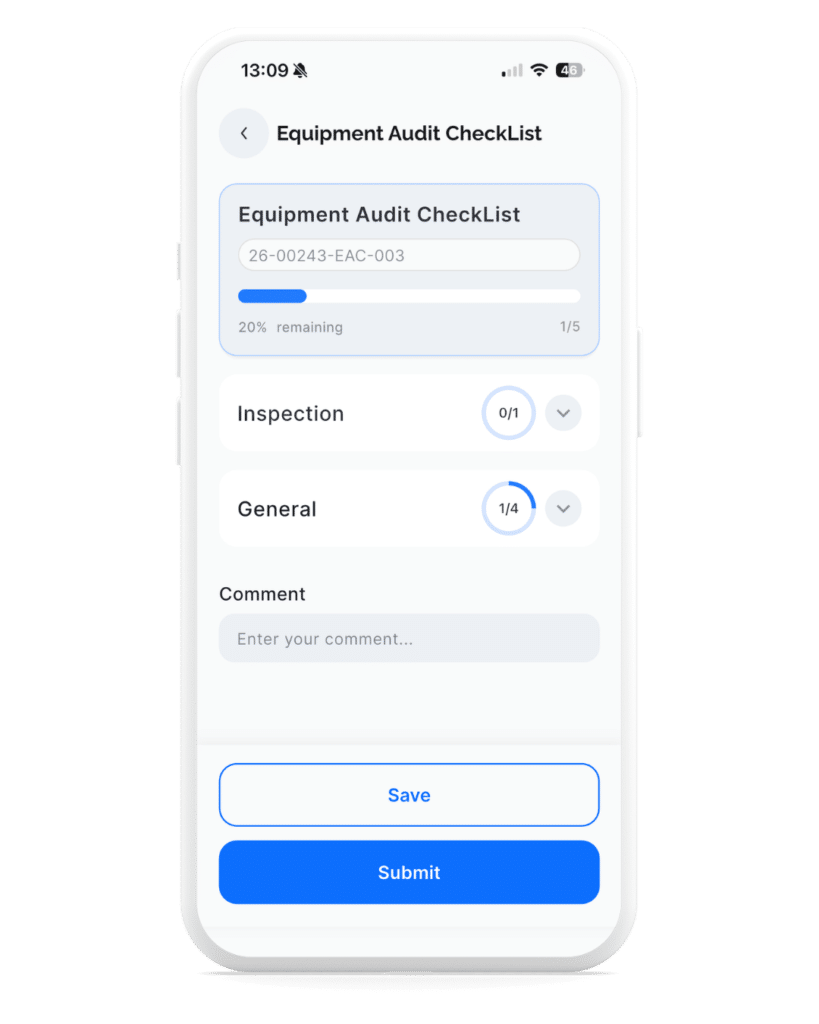
In industries such as construction, oil and gas, maritime, and manufacturing, people who document the work are not always in the office when the work is happening.
What is not recorded in the field is never recorded.
Many deviations, observations and minor adjustments happen far from a keyboard.
When the documentation requires a detour via a PC, the details end up as notes in a work trouser pocket. Or in a text message. Or nowhere. Then the quality system doesn't become a source of learning. It becomes a binder someone searches for during audit week.
The app moves the threshold down to where it belongs. A deviation takes twenty seconds, not twenty minutes after you have re-entered.
What you actually need in the field
Not a scaled-down copy of the desktop version. The features that make a difference when you're not in the office.
QHSE
Reports where it happens
Don't wait until you're back at the office. Register deviations, observations, supplier deviations, customer feedback, and improvement suggestions directly from your mobile. The Quality Manager will see it immediately. Supports ISO 9001, ISO 14001, and ISO 45001.
- Deviation
- Observations
- Supplier deviation
- Suggestions for improvement
- Customer feedback
Personal
Profile, certificates and absence
Employees update themselves. Contact information, personal documents, certificates, course certificates and holidays. Everything accessible and updatable from the app.
- Contact details
- Documents
- Certificates
- Certificate of attendance
- Holiday & Absence
Project
Tasks and Workflows
View project tasks, follow workflows and run checklists. Without calling the office. Add new checklists directly from your phone as needed.
- Project tasks
- Workflows
- Checklists
Documents & News
Always up to date
Access company news from the intranet and get to governing documents. Procedures, routines and guidelines available when you need them. Not when you are back at the office.
- Business News
- Governing documents
- Important updates
From the first coffee to the last deviation. Same phone.
07:30
Check today's job
Tasks, assignments, and deadlines appear before you've even put the kettle on. You see who you're working with and what's on the agenda.
09:42
Register a deviation
Damaged scaffolding. Photo taken, category selected, forwarded. Manager notified. The case is assigned a number before you've even put down your phone.
13:10
Tick off checklist
Final inspection of roof North. The quality control plan is self-sufficient, signature taken on screen, attachments are included with the case automatically.
14:55
Look up the procedure
Question from an apprentice. You search, find the correct version of the procedure and send it within the same app. No detours via the shared drive.
Built for people who don't sit still
Some work at desks. Others work on platforms, construction sites, and customer visits. This app is for the latter.
The project manager
Follows up on tasks and workflows between site visits. Runs checklists on site. Answers questions with actual figures.
Head of KHMS
Registers deviations, observations and improvement proposals in the field. Document with photos, link to project. Finished before the bus leaves.
The employee
Updating certificates and diplomas myself. Applying for holiday from the phone. Checking governing documents when needed. Without asking HR.
CEO
Reads company news and keeps track of the project portfolio from anywhere. No need to call the office to get figures for the board meeting.
One platform. Two entrances.
Business Online App is not a separate product. It is the same platform you already use, accessible from your mobile. Changes are synchronised automatically.
1
Download
Download the app from the App Store or Google Play. Available as an extra feature for all Business Online customers.
2
Log in with M365
Use the account you already have. No extra passwords, no extra setup.
3
Carry on
Choose company and start. Tasks, deviations and checklists. Everything is where it was.
The same security as at the office
The Business Online App uses the same infrastructure and security level as the desktop version. No data is stored locally on the phone.
European data centres
All data is stored in Microsoft Azure in Europe.
Encrypted transfer and storage
End-to-end encryption on all data traffic.
Microsoft 365 login
OAuth 2.0 via your existing M365 account.
Frequently asked questions about the Business Online App
The app provides access to project tasks and workflows, checklists (view and add new ones), deviation reporting (deviations, observations, supplier deviations, customer feedback, and improvement suggestions), governing documents, company news from the intranet, and personal profile details. It includes contact information, documents, certificates, course certificates, children, and holiday and absence.
The Business Online App is available for both iOS (iPhone and iPad) and Android. Download for free from the App Store or Google Play.
Business Online App is an add-on feature that you subscribe to in addition to the Business Online platform. Contact us for pricing, or book a demo to see the app in action.
Yes. You can report deviations, observations, supplier deviations, customer feedback, and improvement suggestions directly from the app. Everything is linked to the correct project and is immediately available to the quality manager on their PC.
Yes. The Business Online App uses the same database as the desktop version. Everything you register on your mobile is immediately available on your PC, and vice versa. One platform, two entry points.
Yes. Employees can update their contact details, upload personal documents, certificates and proof of course completion, register children, and apply for holidays and leave. All directly from the app. HR doesn't have to do it for them.
All data is stored in European Microsoft Azure data centres, encrypted both in transit and at rest. The app uses OAuth 2.0 authentication via Microsoft 365. No data is stored locally on the phone. The same level of security as the desktop version.
Yes. The app has a built-in company selector which allows you to switch between all companies you have access to. Convenient for consultants and managers with cross-functional responsibilities.
You log in with your existing Microsoft 365 account. No extra username or password. The app uses the same Single Sign-On as the rest of Business Online.
Part of the Business Online platform
The app provides mobile access to the platform you already use. Here's the full package.
Do you have any questions about the Business Online App?
Write to us and we'll be in touch within one working day. Or, book a demo with us directly.
Take the overview out of the office
Add the mobile app and give the team access to Business Online. Wherever they are.